Internet Radio Player
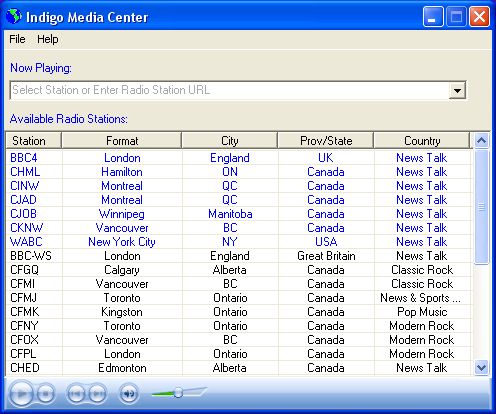
The initial genesis of Indigo Media Center was to simplify the Internet radio listening experience. It puts all the control in one place, much like a push button radio in a car.
The requirements of this software are as follows:
- Microsoft Windows
- Microsoft's dotNet Framework must be installed and is available here. Note: It's already installed if you're using Windows XP.
To get a copy of the software just click on the "Download Here" button on the right. You'll download a file called "Indigo Setup.msi". Just double-click to run it. It'll install a copy on your hard disk, placing a shortcut on your desktop.
The application is pretty self-explanatory. You just click on one of the stations in the list, wait a few seconds, and it'll play.
For more advanced users:
- If there's a favourite station of yours not listed you can paste the URL into the drop-down combo box near the top and press Enter.
- You can also maintain a list of your favourite stations in a file called "UserStations.lst". It has exactly the same format as "AllStations.lst", which you'll find in the application folder, whose default location is: C:\Program Files\IMS\Indigo Media Center
- These are CDF files, with the following syntax for each line: StnName, City, Prov/State, Country, TypeOfStation, AudioURL, StationURL
- Note: The "StationURL" value can be absent if it's the same as the first part of the "AudioURL".
- All entries in "UserStations.lst" will be displayed in blue at the top of the list, thus making them more convenient for you to access.
- This application uses the Windows Media Player. But some Internet radio stations use a different player or must be played in their own window. For such stations, you will see an audio player appear in the upper-right panel.
That's about it. There's much room for expansion and your ideas about where I take the software are very much encouraged! And if you have other favourite stations that you think others might like to listen to, then just leave a comment on this blog. If I feel they have general appeal then they'll definitely be added. They'll then be available to everyone else when they click on the "Check for Updates" option in the Help menu!
Posted at: 1:27 PM



3 Comments:
Very generous of you Robert, thanks for this.
As stations change, a few problems have evolved, but it still works pretty well for me. Since there's not much interest in using this product, I'm not updating it at this time. But one day perhaps!
dennismillerradio.com
Post a Comment
<< Home